Dealers
- The Commissions and Preferences panels have been reorganized and refreshed, including items moving from Preference panel to the Commissions Panel and the addition of toggle controls for improved usability on Preferences.
- The Dealer iPad Dashboard has been redesigned for more sales stats and details, enlarged panels for easier readability, and the addition of the new Contacts and Drivers tab control.
Deliveries
*FIX* Addressed a critical issue where lot-to-customer records were generating no commissions. This fix ensures commissions are applied correctly for these records.
General
*FIX* Resolved an issue where clicking View on a repo email while a report was open would cause the repo screen to replace the report, thus leaving you stuck in a window w/o a way to exit.
Products
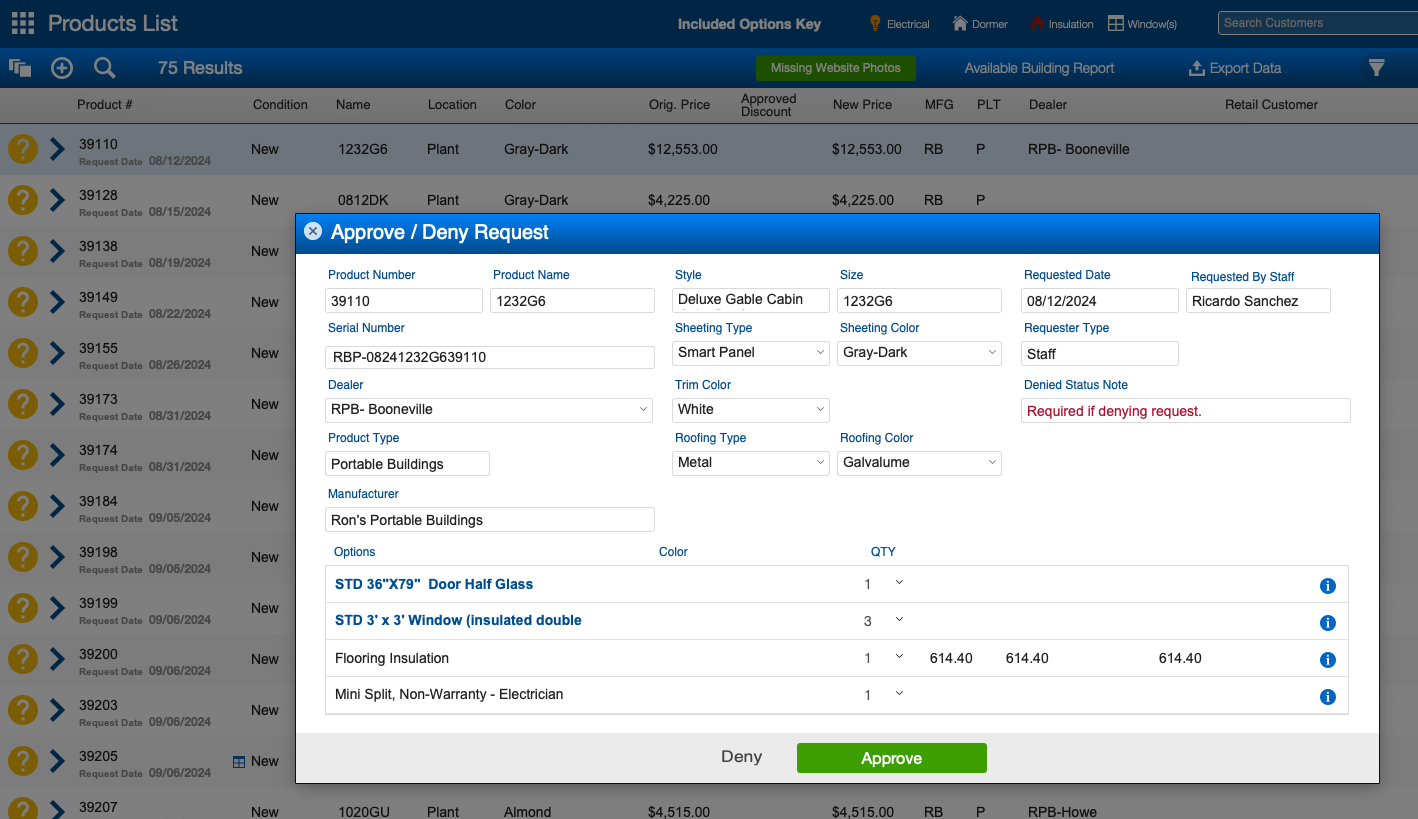
- Enhanced the product approval process by introducing a card window for requests. Users with product approval authority can now click the yellow ? status icon in the product list view to open a card window displaying all product fields for review. This allows for editing, approval, or denial without losing the list of requests, enabling quicker and more efficient approval processing.
- You can no longer submit a building request if any required information is missing, like sheeting type/color. If any required field is missing, you’ll see a clear error message explaining what needs to be filled in. This ensures all requests are complete and accurate before submission.
- *FIX* Fixed Product Duplication for Option Lists. An issue with duplicating products where the entire option list was not copied over. Previously, only the inactive standard option was duplicated, and non-standard options were not handled correctly. Now, the product duplication process ensures that all relevant options, including non-standard ones, are properly copied. After duplication, users are automatically shown the copied product account for easier management of non-standard options.
- To enhance workflow, saving a product no longer automatically navigates to the QR code panel. Instead, users will remain on the current panel, ensuring a smoother and more efficient experience without unwanted navigation.
Quotes
- Users will no longer be able to select payment terms on a quote if any required fields are missing, such as sheeting type/color, roofing type/color, or product options requiring color selection. If any of these fields are incomplete, an error message will appear, clearly indicating what is missing before payment terms can be selected.
- Non-standard options with a quantity of zero will now be automatically removed from the quote or build request before the dealer can submit it for approval. This ensures that only relevant and active options are included in the submission.
Repo/Pickup/Welfare Checks
*FIX* Fixed an issue where the welfare fee was incorrectly showing the repo fee instead of the designated welfare fee. Welfare fees now display and calculate correctly, ensuring accurate payment assignments based on the type of task (e.g., pickup, welfare, or repo).
Reports
- Improved Report Window Management.
- All report windows are now consistently labeled as Report for easier identification.
- Active report windows are now protected from being replaced by other actions, ensuring that reports remain accessible regardless of other tasks being performed.
- Report windows will automatically close before generating a new one, ensuring a smoother workflow and preventing clutter.
- *FIX* Resolved an issue where clicking a hyperlink in a report with a popup window open caused the report to become inaccessible, requiring a forced application closure. Hyperlinks now open correctly without interfering with existing windows
Version 25.01 | Beta Release: 01/15/25 | Client Release: 02/05/25
Was this article helpful?
That’s Great!
Thank you for your feedback
Sorry! We couldn't be helpful
Thank you for your feedback
Feedback sent
We appreciate your effort and will try to fix the article